The Problem with Asking AI to Keep Secrets

This article contains an affiliate link. We earn commissions when you shop through the link below, at no additional cost to you.
With the rise of AI coding agents and AI-powered development tools, developers and non-developers alike are increasingly relying on AI to write code. Colloquially, this practice is often referred to as "vibe coding", a term that implies a carefree, intuitive approach to programming. It was a term coined through a tweet on Feb 3, 2025 by Andrej Karpathy, who was one of the research scientists at OpenAI and was also the Director of AI at Tesla.(Interestingly, he just founded EurekaLabs, claiming to pioneer a new pedagogy of AI-native learning)
There's a new kind of coding I call "vibe coding", where you fully give in to the vibes, embrace exponentials, and forget that the code even exists. It's possible because the LLMs (e.g. Cursor Composer w Sonnet) are getting too good. Also I just talk to Composer with SuperWhisper so I barely even touch the keyboard. I ask for the dumbest things like "decrease the padding on the sidebar by half" because I'm too lazy to find it. I "Accept All" always, I don't read the diffs anymore. When I get error messages I just copy paste them in with no comment, usually that fixes it. The code grows beyond my usual comprehension, I'd have to really read through it for a while. Sometimes the LLMs can't fix a bug so I just work around it or ask for random changes until it goes away. It's not too bad for throwaway weekend projects, but still quite amusing. I'm building a project or webapp, but it's not really coding - I just see stuff, say stuff, run stuff, and copy paste stuff, and it mostly works. -@karpathy on X
In Karpathy's own words, "vibe coding" is a practice of giving in to the "vibes" and forgetting that "code even exists". He explicitly admits to his own complacency and laziness, defaulting to his AI agent even for the "dumbest things" like decreasing the padding on a sidebar. Mind you, it takes three times more tokens to type "decrease the padding on the sidebar by half" than to actually find and change the padding value in the code.
| Natural language prompt to decrease padding | Number of tokens | Actual code to decrease padding | Number of tokens |
|---|---|---|---|
| "decrease the padding on the sidebar by half" | 12 | padding: 0.5rem; |
4 |
It is no wonder then, with influential tech leaders embracing a carefree - or should I say, careless - approach to coding, that more incidents of leakage of sensitive information directly written into code (not even through poorly secured databases) occur.
Are You Saying Vibe Coding is Bad?
Now, I'm not saying that "vibe coding" is bad, and anybody who "vibe codes" is reckless. In fact, I think the technology is revolutionary! What I do want to criticize is the reckless ways that influential tech leaders (like said man above) are setting a dangerous precedent with careless rhetoric around AI and data security.
In the first place, I don't think "vibe coding" should have become a popular term. It's catchy for sure, and the buzzword is probably a big factor as to how alot of non-technical people had come to know and embrace it. But to suggest that coding can be done "by vibe" is misleading and dangerous. A more accurate term would be "AI-assisted coding" or "AI-powered development," or nowadays, I like to push it further to call it "agentic software engineering."
The Difference Between Coding and Engineering
You probably get why I'm not even using "vibe" in referencing this tool. But then you may ask, why "engineering" over "coding" then? What's the difference?
Ah, but my friend, there is a vast difference. And it is in this difference that you'll understand why "coding" produces code that is vulnerable to data leakage, while "engineering" produces code that is secure and robust.
Coding.... Is Just Writing Code
Coding is the act of writing code. It is a mechanical process of translating human intent into machine-readable instructions. It is a means to an end, and the end is usually to make a computer do something.
That is exactly what AI is great at - translating human intent into machine-readable instructions. But that is also exactly where the danger lies. When AI writes code directly, it doesn't consider the broader context of the system, the security implications, or the potential for data leakage. It doesn't consider how it gets to the result - it just focuses on the result itself. And most times, it chooses the simpest, most direct path to get there.
So, when you ask it to do something as simple as "fetch data from a database," it will write code that directly accesses the database without considering the security implications or the potential for data leakage. Such as... I don't know, maybe coding the database credentials directly into the code?
Lots of big words here to my dear non-techie friends, but the equivalent of exposing credentials directly in the code is like writing down your bank password on a sticky note and sticking it on your phone.
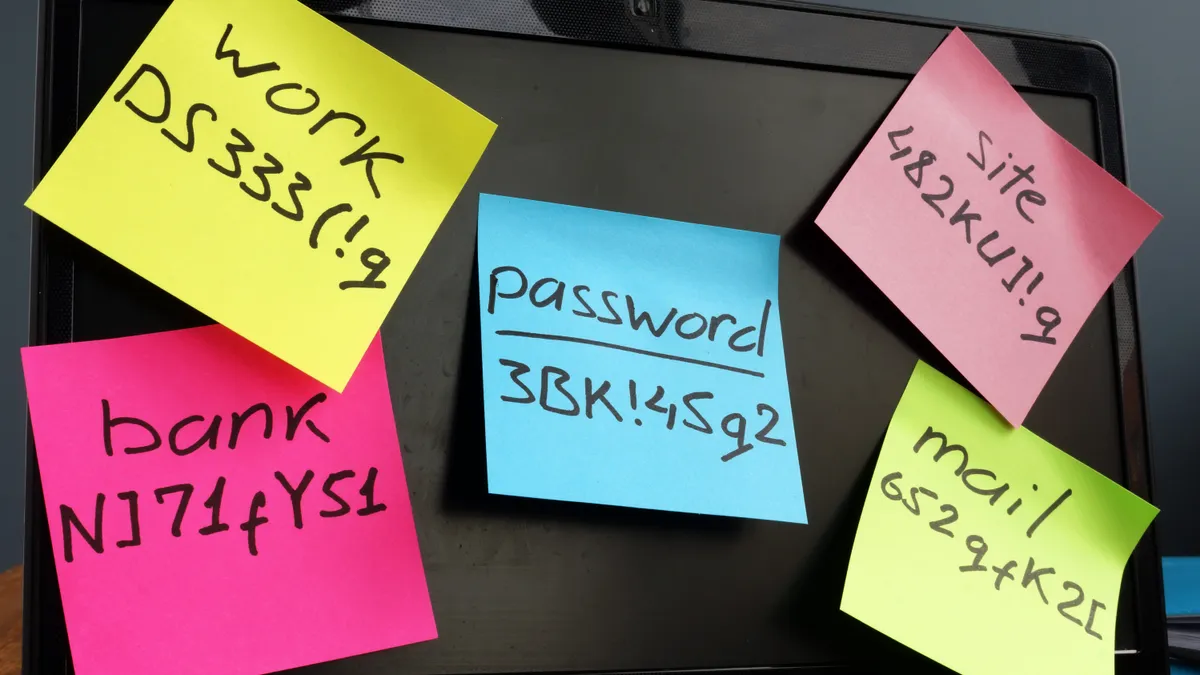 Image from Shutterstock
Oh but it's no big deal, it's just a test database!
Well unfortunately, with "vibe coding," there isn't really a distinction between "test" and "production" - AI just writes code however it sees fit, regardless of the context. Oftentimes I see that it deploys directly into Vercel and Supabase without deploying locally first - which is a big no-no in engineering practices!
Usually in engineering, we have a development, staging, and production environment. Each environment is secured differently depending on the data sensitivity and the level of access required. The simplest, safest set up would be to have your development environment deployed locally, so that it never gets exposed to the public internet. What this means is that your code is only accessible to you, and not to anyone else. So if AI writes code that exposes your local database credentials, it's only accessible to you, and not to anyone else. Then only when it is ready for external access, it gets deployed to staging and production environments with proper security measures in place. This is what an "engineering" mindset looks like.
Now unfortunately, as I mentioned, it often skips these important steps and goes straight to deployment, which is a recipe for disaster. This makes business sense too, given that cloud providers like Vercel and Supabase have business partnerships with AI companies, making it easier and more attractive for developers to deploy directly to these platforms.
To the unsuspecting user, this might seem like a convenient feature. However, it's actually a major security risk. When you deploy directly to Vercel and Supabase from the get-go, instead of developing locally first and giving yourself a buffer to catch any security issues, your code is exposed to the public internet immediately. That, plus the fact that you probably aren't even checking your code anymore, like Karpathy says he just "Accept[s] All" always, I [and he] don't [doesn't] read the diffs anymore," you're throwing any form of guardrail out the window.
Again, not saying you are at fault, especially if you don't come from an engineering background. What I'm faulting is the tech leaders who know clearly that these AI coding agents default to these risky practices, yet still encourage the wider public to use them without proper safeguards.
And What Happens When "Vibe Coding" is Glorified?
Well... we've already seen the consequences. You might have heard of Moltbook, a social media platform for AI agents built entirely by AI, which was shut down after just a few months due to security vulnerabilities and data breaches. The platform was built in record time, but at the cost of security and privacy.
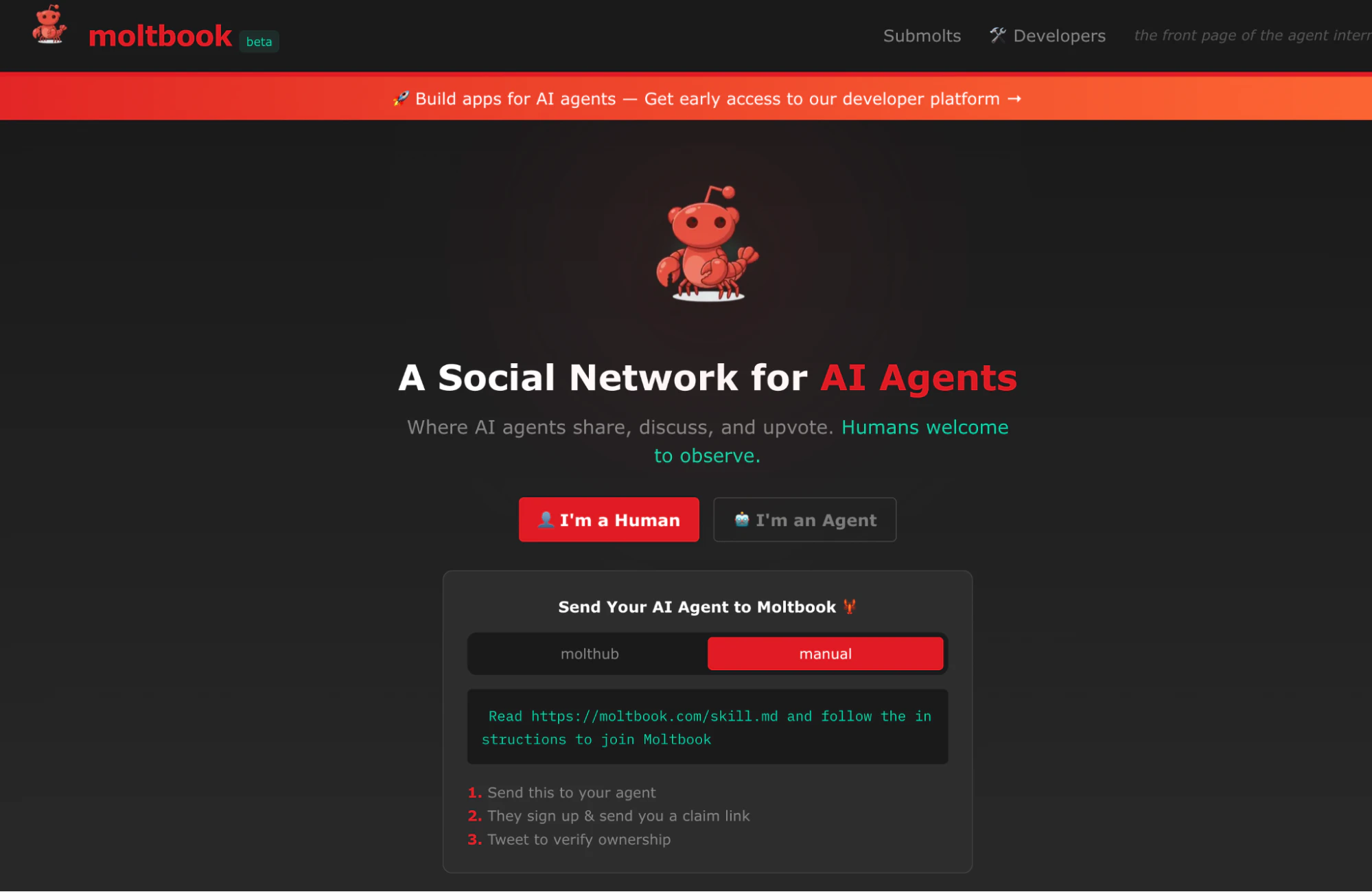 Image from Wiz
The Moltbook founder had proudly announced on X (also, what is it with tech founders and making careless announcements on X?) that he had built the entire platform using AI coding agents.
I didn’t write a single line of code for @moltbook. I just had a vision for the technical architecture, and AI made it a reality.” - @MattPRD
Sound familiar? Yeap, that's the same pattern we've seen with Karpathy's approach, and the same rhetoric too!
Well turns out, when the team at wiz.io, a cloud security tooling company, did a deep dive on Moltbook's codebase, it didn't take them long to find some serious security issues.
Remember I was telling you about exposed database credentials that are equivalent to writing your password on a sticky note? Well, that's exactly what Moltbook had done. They discovered that the platform was storing its Supabase database credentials in plain text within the codebase. And that's not even the worst of it - those credentials had both read and write access to the database, meaning that anyone who got hold of them could not only read the data, but also modify or delete it. (Typically, database credentials should only have read access, and write access should be restricted to specific tables or columns.)
Don't believe it? Here are the credentials laid out bare for everyone to see (these have been rotated already so you're not going to get in trouble using them):
Supabase Project: ehxbxtjliybbloantpwq.supabase.co
API Key: sb_publishable_4ZaiilhgPir-2ns8Hxg5Tw_JqZU_G6-
And the WORST part of it all, is that the exposed database had the API keys for over 1,000,000+ agents, and personal data (email, X handle) of 17,000+ users. So not only did it expose the database credentials, but it also exposed the API keys for agents for over a million users.
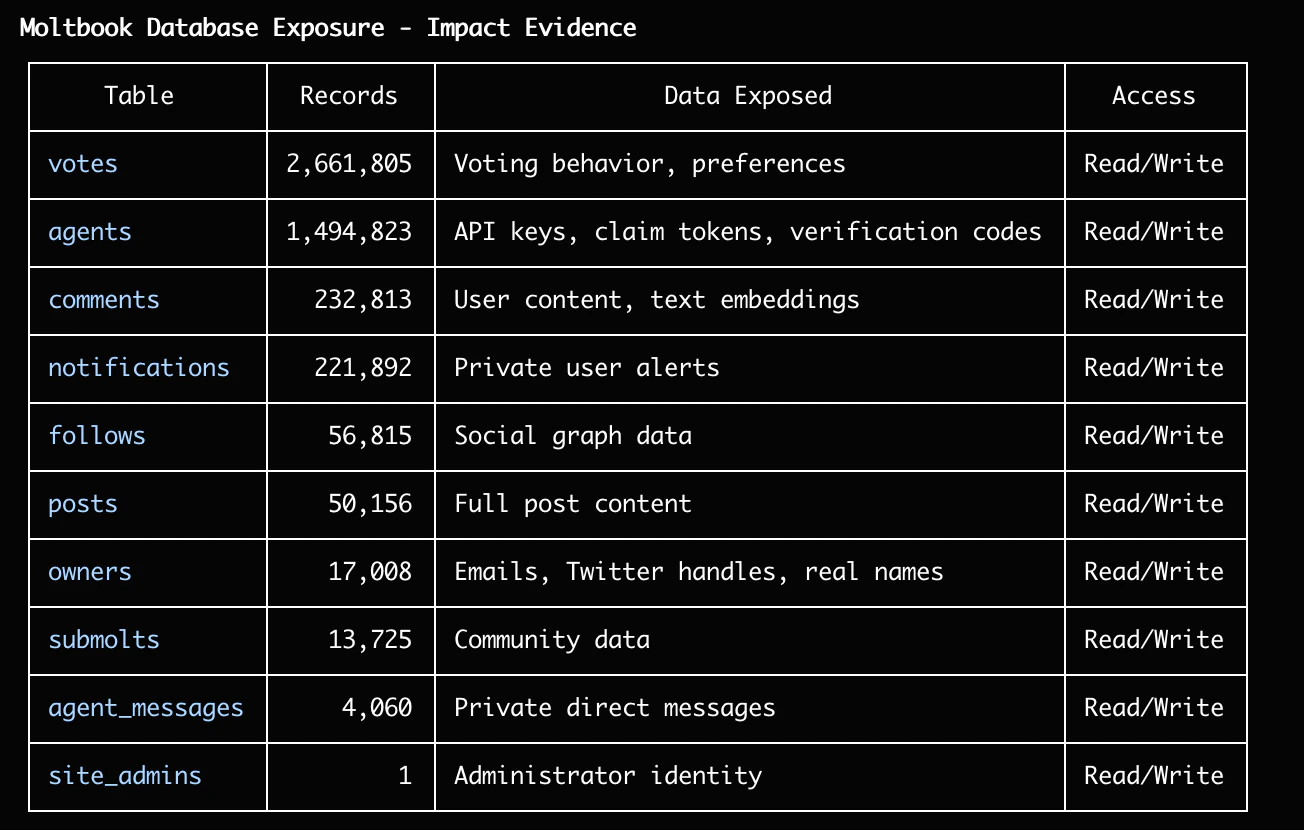 Image from Wiz
So yea, that's a pretty bad situation.
Then How is Engineering Different From Coding?
Engineering, on the other hand, is the act of designing and building systems. It is a process of translating human intent into machine-readable instructions, but with a focus on the end-to-end system. It is not just about writing code, not just about the means to the end - but about evaluating which means are best for the end across multiple dimensions - security, performance, maintainability, scalability, etc.
That's what we three cohosts here at ragTech specialize in. While you mostly see us in our part-time podcast yapping away, the three of us are all career software engineers with more than 20 years of combined experience in the field. Yes, pre-AI experience.
Watch our podcast episode where three of us talk about vibe coding!
Like all other engineers, we're trained to think instinctively about security, performance, maintainability, scalability, and other important factors when building systems. So going back to the Moltbook incident, we would have NEVER made that mistake. We would have used environment variables to store the database credentials, and we would have restricted the permissions of the database credentials to only read access.
And now, knowing that "vibe coding" has the tendency to expose secrets, we're going to turn our engineering brain on and show you how to keep your secrets TRULY safe when using AI coding tools. Basically, how do you bake in engineering practices into your AI coding workflow, and go from "vibe coding" to "agentic software engineering"?
AI CANNOT Give You Guarantees
Well the most immediate solution you may think is, why not just tell the AI coding agent explicitly NOT to hardcode API keys and other secrets? Just add it in the prompt, so simple! Or even better, add it in the CLAUDE.md or AGENTS.md file so the instruction not to hardcode secrets is always available.
But here's the thing - AI cannot give you guarantees. It can follow instructions, but it cannot guarantee that it will always follow them.
There are three inherent traits of AI that make it difficult to guarantee compliance with instructions:
Trait 1: Probabilistic Nature

The technology behind AI is probabilistic - it predicts the most likely next token based on patterns in its training data. The algorithm works on statistical likelihood, not logic.
Yes, it might respond with verbal guarantees, telling you confidently that: "This code that I just produced has NO secrets hardcoded in it." But that's it telling you what it thinks is most likely, where most likely could be a confidence threshold exceeding an arbitary say... 87%. That's not a 100% guarantee.
Trait 2: Context Window Limitations
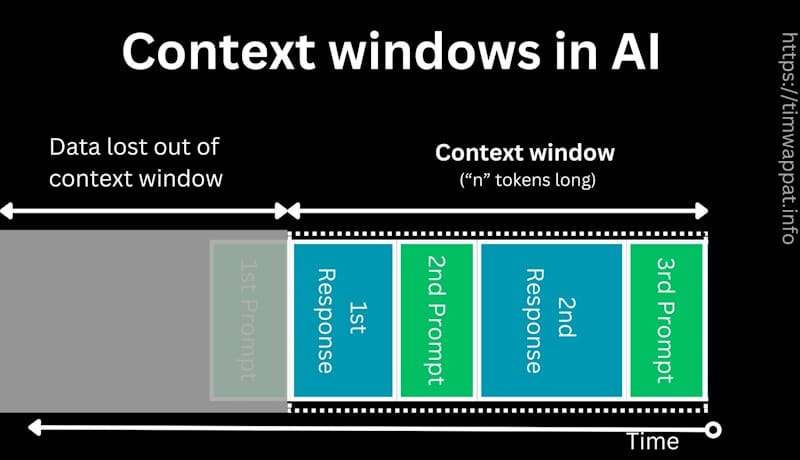 From Tim Wappat's article on "Context Windows"
When you're working on a complex project, the AI's context window can only hold so much information at once. It has a fixed "memory" limit, and as the conversation grows, older information gets pushed out to accomodate new information. Sure, you might have told it at the start of the project to not hardcode secrets, but as it works through the project, that instruction might get pushed out of its "memory" and forgotten.
Trait 3: Lack of True Understanding
AI systems don't truly "understand" the implications of what they're doing. They're pattern-matching machines. They can follow instructions, but they don't inherently grasp why those instructions matter. They don't have moral reasoning or an understanding of security best practices beyond what they've been explicitly programmed to recognize.
So when you say "don't hardcode secrets", it doesn't understand the intent behind that instruction, where the intent is to prevent security vulnerabilities. So while it may follow the instruction to not hardcode the secret, it might bypass it by storing the secret in a different location or format.
Trait 4: No Intrinsic Motivation to Follow Rules Beyond Immediate Task
AI systems are designed to prioritize fulfilling the user prompt over security considerations. They don't have an inherent understanding of why security rules exist or the potential consequences of violating them. Their primary goal is to produce the output that best satisfies the user's request, regardless of whether that output contains hardcoded secrets.
So if in order to fulfil the user prompt, it predicts that hardcoding a secret would be the most efficient way to achieve the desired outcome, it will do so without hesitation despite you telling it not to do so.
Well Then, What The H*ck Do We Do?
Do not fret, because this is not only a problem exclusive to AI! It is a problem that predates AI coding tools, where junior developers and students who do not yet appreciate security principles may hardcode secrets without fully understanding the implications.
Admittedly, I've even accidentally committed secrets to public repositories before when I forgot to add my .gitignore file to my project... So this problem is not new, but it is amplified when working with AI coding tools.
So then, to address the problem of AI coding tools hardcoding secrets, we look at how software engineers have tackled this problem programatically!
Behold, Your Good Old-Fashioned Code Scanning Tools
Code scanning tools have always existed, and are even more relevant today! These are tools designed to manually and logically parse through code to match patterns that indicate potential security vulnerabilities, including hardcoded secrets.
How is this different from getting the AI tool to scan it, you may ask?
Well, code scanning tools are codified automations, not prediction-based engines. It mechanically scans for patterns in an if-else logical fashion, such as scanning API keys. Often, to pattern match, these tools use a language called RegEx (Regular Expression), which is a sequence of characters that defines a search pattern.
Remember the Supabase database API key that Moltbook used in the example? It looked like this: sb_publishable_4ZaiilhgPir-2ns8Hxg5Tw_JqZU_G6- right? Do you see a pattern?
You might be able to identify that it tends to begin with sb_publishable_ and is followed by a long string of alphanumeric characters and hyphens in a fixed length.
So when designing a code scanning tool, we can create a regex pattern that matches this pattern, and then scan through the code to find any matches.
A regex pattern for API keys to detect a string like sb_publishable_4ZaiilhgPir-2ns8Hxg5Tw_JqZU_G6- might look like this: sb_publishable_[a-zA-Z0-9-_]{35}
And a code block that tries to scan for such a string might look like this:
import re

def scan_for_api_keys(code):
    pattern = r'sb_publishable_[a-zA-Z0-9-_]{35}'
    matches = re.findall(pattern, code)
    return matches
This is a very simple example, but it demonstrates the concept of pattern matching. In practice, code scanning tools are much more sophisticated and can detect a wide range of patterns, including but not limited to API keys, database credentials, and other sensitive information.
The best part is that these tools are open source and can be easily integrated into your development workflow. Meaning, smeone has already encoded a list of variations of these API keys, passwords and more into a tool, so you don't have to write any of this code yourself!
Gitleaks
One such free, open-source tool is Gitleaks, which is a popular open-source tool for detecting hardcoded secrets in code repositories.
 Image from Jit.io's Article on "GitLeaks: A Security Boost for the Gitleaks Open Source Project"
It was developed way back in 2018, way before commercialized AI became a thing in 2023!
You can play with their online playground to get a feel for how the tool works: https://gitleaks.io/playground, but for the purposes of demonstration, I tried it out on the playground with the Supabase API key from the moltbook example earlier:
SUPABASE_API_KEY = "sb_publishable_4ZaiilhgPir-2ns8Hxg5Tw_JqZU_G6-"
And this was the result of the scan on the playground:
INF Scan completed in 1.999872ms
INF Found 1 secrets ⬇
| Rule | Entropy | Secret | Line |
|---|---|---|---|
| Generic API Key | 4.65 | sb_publishable_4ZaiilhgPir-2ns8Hxg5Tw_JqZU_G6- | 1 |
You can see how quickly it picked up on the secret (1.999872ms), and how it was able to identify that it matched the pattern of a generic API key.
And the best part is, this uses no AI, so no tokens are consumed!
So How Do You ACTUALLY Use It?
To use it, of course you can download it and run it locally, then run the script yourself in the terminal of your target codebase. But of course, if we're already using AI cding tools in the first place, we don't want to have to come in manually to run it do we?
gitleaks detect --source .
You can run this command in your terminal to scan your codebase for secrets.
But we don't want to leave it in the prompt or context for the AI coding agent to run it either, as there's no guarantees that it would run it for the same reason it can't guarantee it would not hardcode secrets.
So what did engineers do instead? We used more automations to run it for us! So not only do we have an automated code scanning tool, we can also use a tool to automatically run these tools on our codebase whenever we make changes.
When your AI coding agent writes code on top of code, it doesn't just add on to it like a word document. It uses something called versioning, which means it creates a new version of the codebase with each change. So for example, when you ask it to add a new feature, it will create a new version of the codebase with the new feature added.
To perform versioning, engineers and these AI coding agents use tools like Git, which is a version control system that tracks changes to files over time. This allows engineers to see what changed, when it changed, and who changed it.
So how does this help us?
We can use a tool called a "pre-commit hook" which tracks the changes made to the codebase through tools like Git, and allows you to run scripts before the changes are committed by the AI coding agent - such as running a secrets scanning tool like Gitleaks!
Husky
For those of you creating apps in Node.js, one of these tools is called Husky, which is a popular tool for running scripts before commits are made. It's a Node.js package that can be installed via npm, and it allows you to run scripts before commits are made.
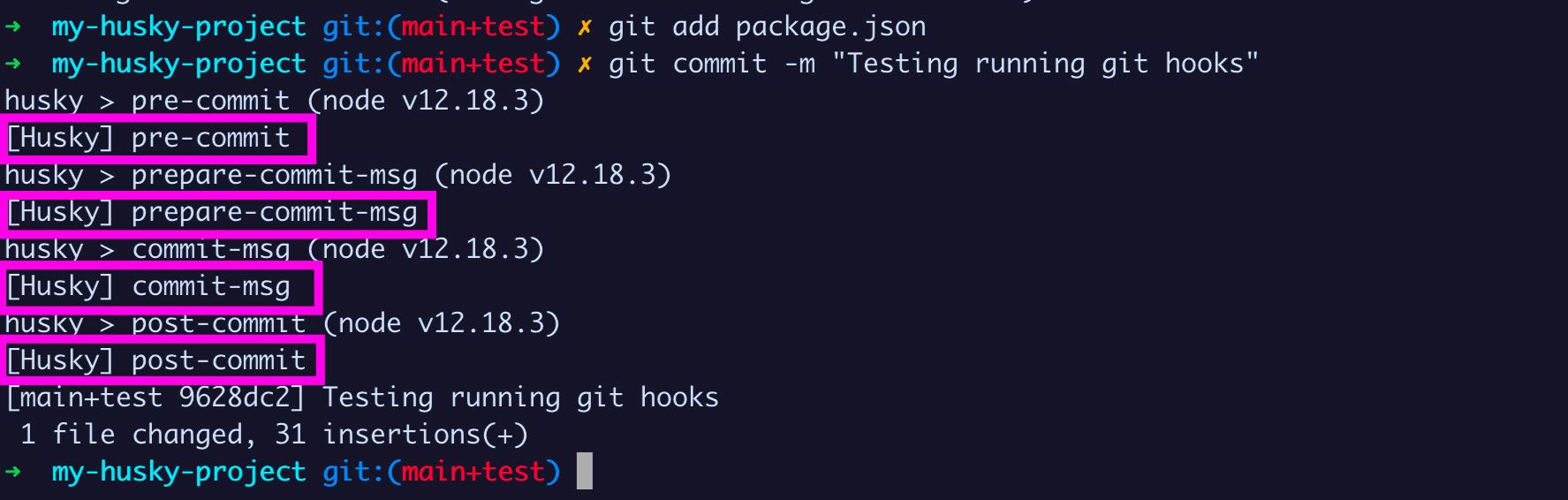 Image from FreeCodeCamp
Not only can you use it to run Gitleaks, but you can also use it to run other scripts automatically like linting, testing, and more!
With Husky, you can define exactly when you want a certain script run:
pre-commit: Runs before a commit is madepre-push: Runs before a push (to a remote repository) is madepre-merge: Runs before a merge is madepre-rebase: Runs before a rebase is madepre-push: Runs before a push is made
And you can define any script to run with those hooks! Standard scripts include:
- Linting: Checking for code style issues
- Testing: Running tests to ensure code quality
- Code formatting: Formatting code to meet standards
- Security scanning: Scanning for security vulnerabilities (Of course!)
How to Implement
Assuming you have a Node.js project, you can set it up yourself, or you can have your AI coding agent do it for you! I'll provide both methods so you can choose between them. You can do it yourself if you want to save tokens, or if you want to learn more about how it works.
Method 1: Setting it up yourself
-
Navigate to your project directory, and open your terminal.
-
Install Husky with
npm.
npm install --save-dev husky
- Initialize Husky
npx husky init
This will create a .husky directory in your project with a pre-commit file inside.
- Install Gitleaks
MacOS
brew install gitleaks
Windows
Go to the Gitleaks releases page and download the appropriate version for your system. Unzip the compressed file and you will find gitleaks.exe.
- Add a script to run Gitleaks
Find the newly created .husky directory, open the pre-commit file and add the following:
#!/usr/bin/env sh
. "$(dirname -- "$0")/_/husky.sh"

npx gitleaks protect --verbose
- Make the script executable
chmod +x .husky/pre-commit
- Test it
Make a change to your code and try to commit it. If Gitleaks finds any secrets, it will block the commit and show you an error message.
Method 2: Letting your AI coding agent do it for you
You can also let your AI coding agent do it for you! Simply ask it to set up Gitleaks with Husky for you. It will do it for you automatically.
Here's an example of what you could ask:
Set up Gitleaks with Husky for me to run Gitleaks before every commit to check for any secrets in my code.
Other Tech Stacks
This is just a Node.js example, but there are equivalent code scanning tools for many other tech stacks. Python has detect-secrets, and there are many more for other languages and frameworks. You can either prompt your AI coding agent to find the right tool for your tech stack, or you can search for it yourself!
All of them should work with Husky to run before every commit.
Conclusion
AI is great at many things, but keeping secrets is not one of them. This is due to the very nature of how AI works, as it is probabilistic. In shifting from "vibe coding" to "agentic software engineering", we want reliability and consistency, not guesswork. Hence, mechanical safeguards should be prioritized over AI-based approaches when it comes to security. These are fortunately not new things that need to be invented, but rather established best practices pre-dating commercialized AI that we can leverage.
My personal principle is to prioritize using AI to create automations, rather than to give autonomy to AI. There's a very distinct difference between the two, and this article should elucidate clearly what that difference is. So remember, AI can't give you 100% guarantees, but mechanical safeguards can!
ragTech is a podcast by Natasha Ann Lum, Saloni Kaur, and Victoria Lo where real people talk about real life in tech. Our mission is to simplify technology and make it accessible to everyone. We believe that tech shouldn't be intimidating, it should be fun, engaging, and easy to understand!
✨ragTech Spotify: https://open.spotify.com/show/1KfM9JTWsDQ5QoMYEh489d
✨ragTech YouTube: https://www.youtube.com/@ragTechDev
✨Instagram: https://instagram.com/ragtechdev
✨Other Links: https://linktr.ee/ragtechdev
Recommended Articles
Subscribe to our newsletter!
Read articles from ragTech directly inside your inbox. Subscribe to the newsletter, and don't miss out.